GitLab: https://gitlab.com/thrikreen/toolmanager
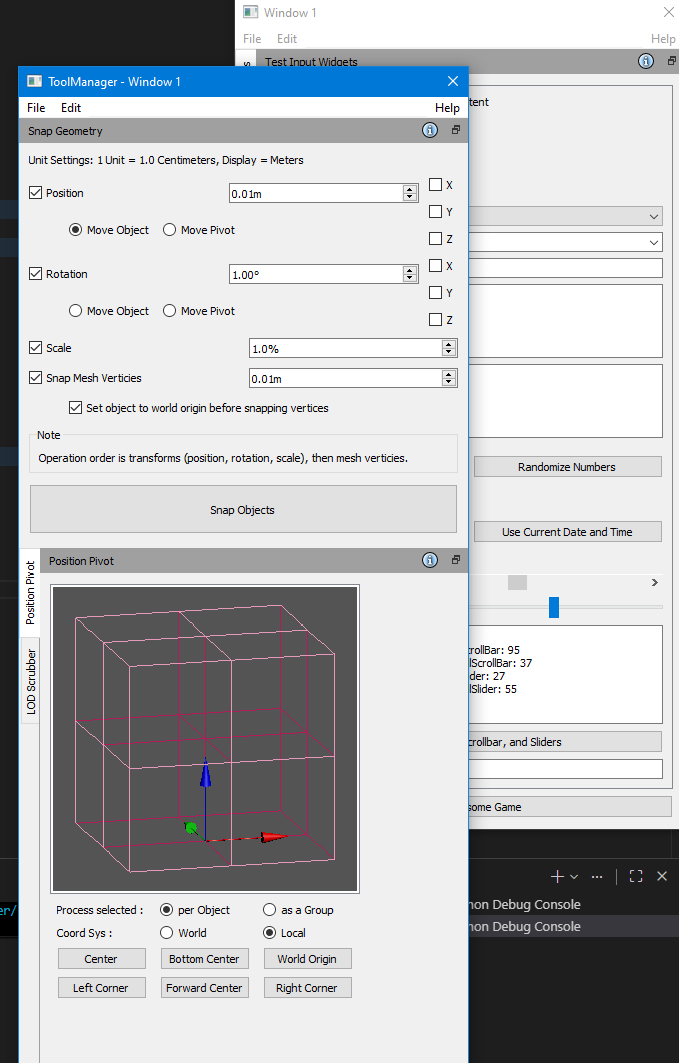
This is my attempt at making a flexible cross-DCC (Digital Content Creation) tool manager using PyQt. The premise is to have a unified UI and behaviour, so from an artist perspective, things are consistent as much as possible.
Quick summary of some if it’s planned features:
- Tools would Interface with the DCCs using a wrapper API, so it would translate to the DCC specific commands behind the scenes. This should ease development as long as most of the commands are able to be replicated.
- The UI can be handled by Qt code within the tool, or it will automatically look for an associated QtDesigner .UI file of the same name as the tool to load, speeding up dev time.
- Settings are also handled automatically and stored in the user’s ‘My Documents’ area for ease of management (Had one incident where a tool was saving its settings into the Perforce project directory). It can automatically save and restore settings for some recognized input widgets as well.
- As tools are set up as QDockWidgets, they can be customized for placement as floating or docked, and which quadrant of the window to dock as.
- Added a way to drag’n’drop QDockWidgets between windows, or making new ones if two floating widgets are dragged on top of each other. Like replicating Photoshop’s palette system. The default Qt system doesn’t support this system of moving QDockWidgets between QMainWindows.
- Other ToolManager management systems would be handled by said QDockWidgets as well. The manager itself is just the display handling platform. So it would include things like syncing tools to Perforce or Git, managing ‘workspaces’ (lists of specific tools to load based on discipline, i.e. environment, characters, animation, etc.). These would be done outside the manager itself to simplify the development focus.
- Each tool has a Help button link that points to a URL, so one can set it up to link to a specific intranet page for a project/company specific tool, while keeping the other generic tools pointing to the public pages.
- Will support multiple tool paths, so you can have its default of generic tools, and also point to a company or project specific directory that is kept separate from the generic stuff due to NDAs and such.
Tool help pages are listed as children pages under this one: